


![[Free Monitor] Wattcycle V2 48V 105Ah Golf Cart Bluetooth LiFePO₄ Lithium Battery – 250A BMS for High Torque & Hills](http://www.wattcycle.com/cdn/shop/files/2000x2000_1_300x.webp?v=1790072112)
![[Free Monitor] 48V 100Ah Golf Cart Bluetooth LiFePO₄ Lithium Battery - 200A BMS](http://www.wattcycle.com/cdn/shop/files/WT48V100AH200GC_300x.webp?v=1777023011)


![[Free Monitor] Wattcycle V2 48V 105Ah Golf Cart Bluetooth LiFePO₄ Lithium Battery – 250A BMS for High Torque & Hills](http://www.wattcycle.com/cdn/shop/files/2000x2000_1.webp?v=1790072112&width=320)
![[Free Monitor] 48V 100Ah Golf Cart Bluetooth LiFePO₄ Lithium Battery - 200A BMS](http://www.wattcycle.com/cdn/shop/files/WT48V100AH200GC.webp?v=1777023011&width=320)


Running out of usable runtime is the biggest frustration for power station owners, especially during extended trips, off-grid work, or power outages, and while official Expansion Batteries are designed to solve that problem. But they are often expensive due to proprietary communication systems and brand premiums. This article explains how to use a more affordable LiFePO4 battery via the Extra Battery Port, detailing the critical technical rules on voltage, chemistry, and power limits that must be followed. The goal is to help you understand the underlying system logic and make a fully informed decision.
What is an Extra Battery Port?
Many modern portable power stations include a dedicated Extra Battery Port. The ports are designed to do two things at once. First, they move a lot of DC energy between the external pack and the host unit. Second, when used with official expansion battery, they carry a communication channel that lets the host identify the battery, display combined SOC (state of charge) on the power station, and coordinate charging and discharging.
When you choose other more affordable LiFePO4 battery for expansion, you are usually using this extra battery port for your core purpose, the DC power transfer. That is a perfectly valid approach. It requires understanding a few strict compatibility rules and accepting the trade-offs around communication and display.
DIY Trade-off: What You Give Up and What You Gain
Because proprietary communication protocols differ by brand, a power station typically cannot recognize a other brand LiFePO4 battery connected through the Extra Battery Port. As a result, the host screen will continue to display only the internal battery’s state of charge, without a combined percentage that reflects both the internal battery and the external battery bank.
In exchange, You are no longer paying a premium for private protocols and brand premiums and can direct your budget entirely toward usable energy capacity and battery quality. This often means gaining the same, or even several times more total capacity as an official Expansion Battery, at only half or even one-third the price.
You are no longer limited to power station fixed capacities and can choose a LiFePO4 battery ranging from tens to hundreds of amp-hours based on your actual needs.
Put simply, you trade the convenience of seeing the all remaining capacity on screen for the substantial savings and flexible, larger capacity of a DIY solution.
Mandatory Compatibility Checks
Before purchasing or connecting any external battery, you must complete the following compatibility verifications. These are not recommendations—they are essential prerequisites for a safe and functional system.
Port confirmation
Make sure your power station actually has a dedicated Extra Battery Port (physically distinct from the solar input). Do not use a solar input as if it were an expansion port. Although they are both DC ports, the input power is different, and the physical shape of the ports is also different.
Voltage system
The nominal voltage of your external LiFePO4 battery must exactly match the nominal voltage of your power station's internal battery.
This is non-negotiable because the Extra Battery Port connects the external battery directly to the power station's internal battery DC bus, effectively placing the batteries in parallel, thereby increasing the capacity. A voltage mismatch can lead to dangerous uncontrolled current flow, trigger protection circuits, cause conflicts between battery management systems (BMS), or result in permanent damage. Therefore, the voltage of your expansion battery must be consistent with the nominal voltage of the internal battery of the power station. Check your power station's specifications for its internal battery voltage (commonly 12V/12.8V, 24V/25.6V, or 48V/51.2V) before selecting your expansion battery.
Chemistry consistency
Both the power station's internal battery and your external expansion battery must use LiFePO4 (Lithium Iron Phosphate) chemistry. Different lithium chemistries (e.g., NMC) have different voltage curves and charging requirements. Using matching LiFePO4 chemistry ensures compatible charging profiles and eliminates the risk of chronic overcharging or undercharging.
Power Limits: Port Input vs Battery Output
Every Extra Battery Port has a maximum input power and a maximum input current specification, for example 500W or 700W. Even if your battery can deliver 2,000W, the port will cap how fast the power station draw from that external LiFePO4 battery. This limit defines expansion battery charge and discharge rates. The output power of the external LiFePO4 battery should be less than the maximum input power of the Extra Battery Port, which determines the maximum speed at which the power station can draw power from the Extra LiFePO4 battery.
Connectors and Adapters
Successfully connecting your expansion battery to the power station's Extra Battery Port requires the correct physical interface and safety hardware. This is not a standard universal connection, and using improper cables or omitting safety devices can lead to failure or hazard.
The physical connector on the power station's Extra Battery Port is almost always a proprietary design specific to the brand (e.g., a custom multi-pin connector used by Bluetti, Anker, or Pecron, and Ecoflow is XT150 connector). It is distinctly different from common solar input ports like XT60 or MC4.
Essential Tools
What is the WattLINK Extra Battery Cable?
The WattLINK is a dedicated expansion cable built to connect WattCycle 48V LiFePO4 batteries directly to portable power stations. Rather than relying on generic adapters or workarounds, WattLINK is purpose-built for this pairing, supporting bidirectional power flow so your power station can charge the external battery bank and draw from it when needed. The cable uses 8AWG wiring with M8 and XT150-style connectors, giving you a high-current, low-resistance connection that handles the demands of real-world off-grid and backup power use without compromise.
Understand the precautions when using WattLINK.

Charging Your Expanded System
Charging the combined system is straightforward and can be done through two primary methods.
Using an External Charger: Connect a standard LiFePO4 battery charger directly to your expansion battery. In the Bluetooth App, keep your expansion battery in the discharging state. Both your expansion battery and the power station's internal battery will be charged simultaneously through the direct parallel connection.
Using the Power Station's Input: When you charge the power station via its AC or solar input, it will also supply charge to the connected expansion battery through the Extra Battery Port. To ensure the external battery accepts this incoming charge, You need to manually switch the expansion battery to the charging state in the Bluetooth App. Monitor the charging status of your external battery via this app or its built-in display.
It is important to remember that this DIY expansion creates a system with two independent management points. The power station's display will only reflect its own battery's status, so you must rely on your expansion battery's Bluetooth app or built-in display to monitor its charge level. For the system to function whether discharging to run devices or charging—the DC Circuit Breaker in your adapter cable must always be in the "ON" position to maintain the essential electrical circuit between the two units.
Why Choose a WattCycle Server Rack Battery for Expansion?
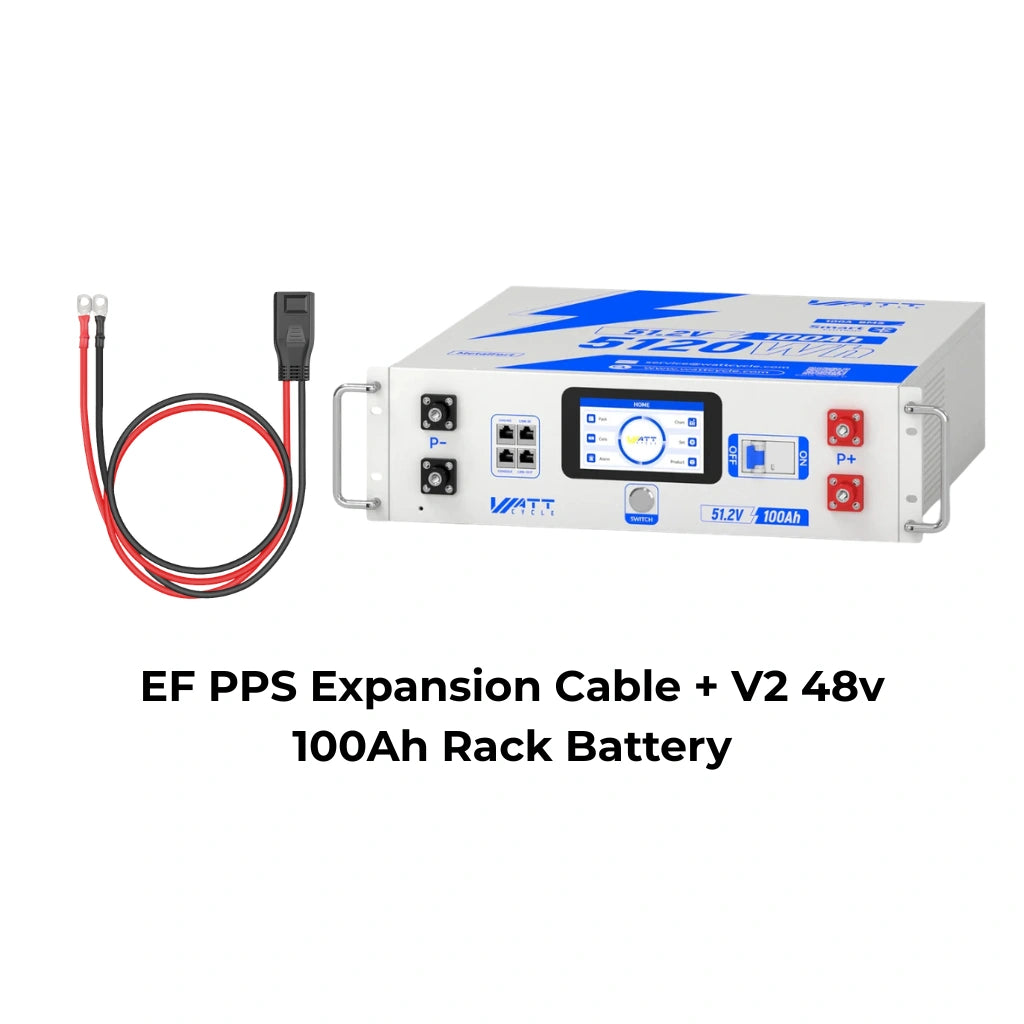
WattCycle 48V Sever Rack Battery
(We’ve prepared an exclusive offer for you. Use discount code BLOGEXTRA at checkout to get 6% off your order. It’s our way of saying thanks for being a blog reader)
A WattCycle 51.2V 100Ah Server Rack Battery is engineered to be the ideal partner for DIY power station expansion, specifically designed to overcome the limitations of generic third-party batteries.
It delivers superior value where it matters most: capacity. The unit provides a substantial 5.12 kWh of energy storage, typically at a fraction of the cost per watt-hour compared to a brand-matched expansion module. This translates to acquiring multiple times the total capacity for the same budget or less, making it the most cost-effective way to significantly extend your runtime.
Its integrated high-definition LCD touchscreen provides the precise, local monitoring that your power station's display cannot. You regain clear oversight of your expansion battery's true State of Charge, voltage, and status at a glance, turning a key compromise into a non-issue.
For intelligent control, the companion WattCycle Bluetooth App allows for remote monitoring and essential management. This is particularly useful during charging cycles, where you can manually verify or adjust the battery's operating mode via the app to ensure it seamlessly accepts charge from your power station, guaranteeing the entire system charges completely and efficiently.

Disclaimer & Compatibility Notice:
The information and examples on this page are provided for general, educational purposes only and do not constitute electrical, installation, or engineering advice. Any runtime, performance, or use-case examples are based on specific test conditions and are for reference only. Actual results may vary depending on your power station model, environment, settings, connected loads, and system configuration.
For clarity, we may reference popular portable power station brands (e.g., Bluetti, Jackery, EcoFlow) solely for identification and discussion purposes. Such references do not imply compatibility, endorsement, affiliation, sponsorship, or partnership, and we make no guarantees regarding interoperability with any third-party product.
Before purchasing, please verify your device specifications (especially input voltage range, maximum input power/current, and approved connection methods) and follow the manufacturer’s instructions. If you are unsure, consult a qualified electrician, RV/solar installer, or certified technician. For product-specific questions about our batteries, please contact WattCycle customer support service@wattcycle.com.
This article applies to power station models equipped with a dedicated Extra Battery Port. If your device only has a solar input port and lacks a dedicated expansion port, please refer to our advanced guide: “How to add an extra battery to power station through the Solar Input Port.”


Comments
No comments yet. Be the first to share your thoughts.
Leave a Comment